

Drupal migration • Brussels
Is your Drupal site reaching end of life? Move to Wagtail
Drupal 7 has been unsupported since January 2025, and Drupal 10 support ends on 9 December 2026. We migrate Drupal websites to Wagtail, the open source CMS closest to Drupal in the way it structures content: your pages, languages, media and URLs come along.
Where does your Drupal version stand?
Official end-of-support dates, checked on 30 October 2026:
- Drupal 7: unsupported since 5 January 2025. Only paid extended support (HeroDevs, Tag1) still ships fixes.
- Drupal 8: unsupported since November 2021.
- Drupal 9: unsupported since November 2023.
- Drupal 10: support ends on 9 December 2026.
- Drupal 11: supported until Drupal 13 ships, at a date not yet set.
An unsupported site keeps displaying normally. The risk sits underneath: every flaw found in Drupal core or in a module stays open, contributed modules get abandoned one after another, and developers who still know Drupal 7 are getting hard to find. Extended support buys time without settling the question. We explain why an abandoned version ends up costing a lot in our article on PHP2Shell.
Drupal 11 or another CMS?
If your site runs Drupal 10, works for you and your team knows Drupal, moving to Drupal 11 is often the shortest path: since version 8, major upgrades no longer mean rebuilding everything.
A Drupal 7 site is a different story. Drupal 8 replaced the whole architecture, and going from 7 to 10 or 11 means rebuilding the site: new content models, a new theme, modules to replace, content to migrate. The work is the same as switching CMS, which makes it the right time to ask whether Drupal is still the best tool for your team.
The same question applies to Drupal 8 or 9 sites left without updates for years: the modules they rely on often no longer exist in recent versions.
Wagtail, the CMS closest to Drupal
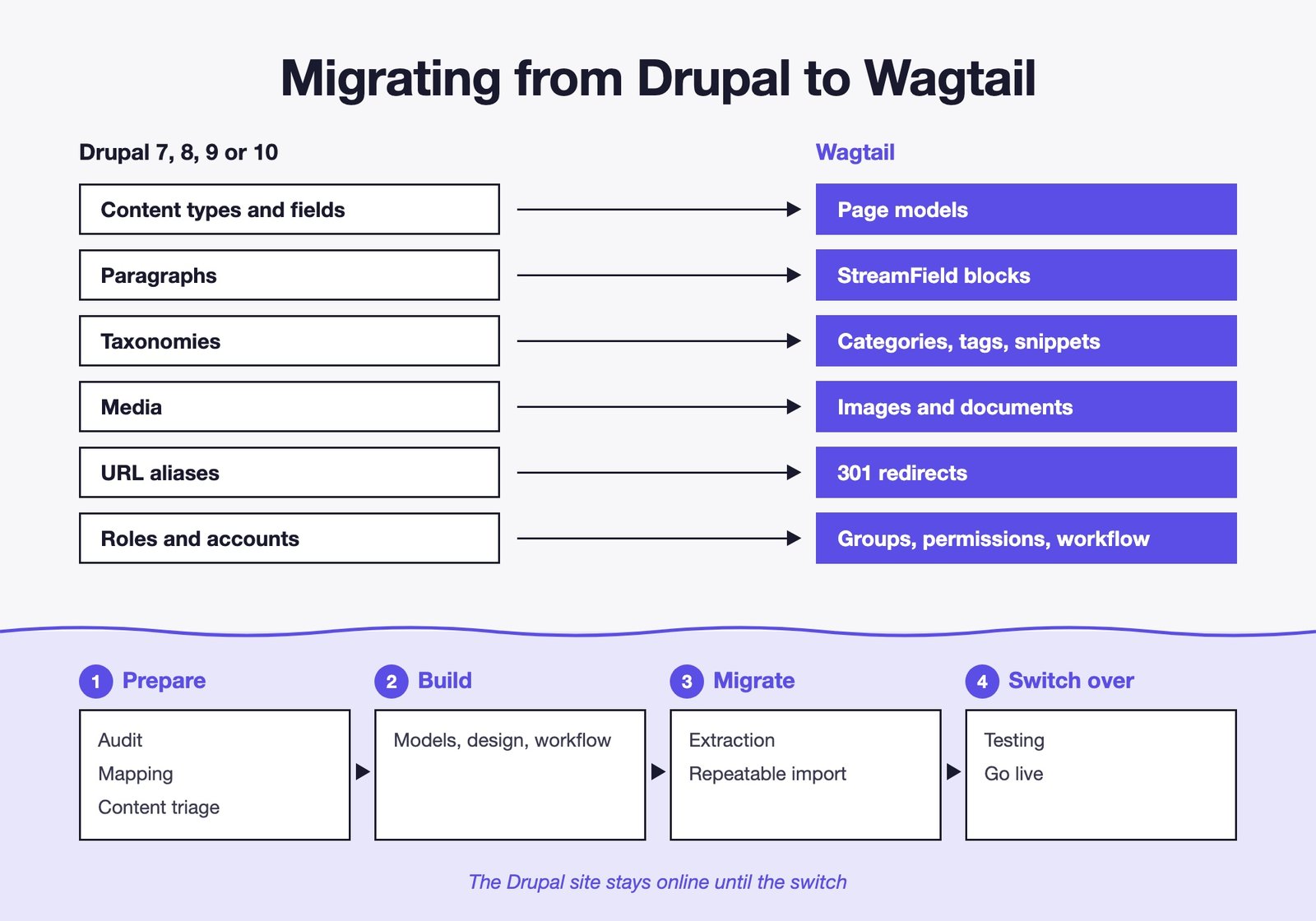
Wagtail is an open source CMS built on Django (Python). Like Drupal, it assumes a serious website needs structured content: page types with their fields, reusable blocks, taxonomies, permissions per team. Your habits carry over almost one by one:
- Content types and fields: Wagtail page models, with exactly the fields you need.
- Paragraphs: StreamField, where editors build their page from blocks (text, image, quote, key figures, call to action).
- Taxonomies: categories, tags and content shared across pages.
- Views: index pages and filtered lists, custom-built and fast.
- Webform: Wagtail forms, or a custom form when you need more.
- URL aliases: readable addresses and 301 redirects managed in the admin.
- Roles and permissions: groups with rights per section of the site.
The difference shows most on the editors' side. Wagtail's interface is designed for people whose job is not the web: no dozens of configuration screens, no module to enable for every need. You edit the page, preview it, publish it.
What Wagtail brings to an association
Less maintenance
The essentials live in Wagtail core and in your own code, with no pile-up of third-party modules. Fewer dependencies, safer updates and a smaller attack surface.
A long-term support (LTS) release ships every year and gets security fixes for about eighteen months: your site is updated once a year, from LTS to LTS.
Open source, no licence
BSD licence, no fees, code that belongs to you.
Python and Django are among the most widely used technologies: you depend neither on a vendor nor on a single agency.
Your data in Europe
Your site and your data stay on European servers, with the host of your choice.
That matters for organisations that care about GDPR and digital sovereignty.
A real approval workflow
In an association, a page rarely goes live without review: the communications officer writes, the policy lead approves, the secretariat signs off. Wagtail handles that circuit natively.
- Multi-step approval: you define the steps (review, policy approval, publication) and the groups that approve each one.
- One workflow per section: news goes through communications, position papers through the board, a working group's pages through its coordinator.
- Pages locked during review: nobody edits a text that is being approved.
- Notifications on every submission, approval or rejection, with reviewers' comments.
- Scheduled publishing: an embargoed press release goes out on time, an event page comes down after the date.
- Full history: every version is kept, comparable and restorable.
- Preview on desktop and mobile before publishing.
Drupal also offers a moderation module. In Wagtail, the workflow is set up from the admin, with no development, and stays easy to follow for occasional reviewers.
Multilingual, at European scale
A European association often publishes in English, French and German, sometimes in all 24 official EU languages. Wagtail handles each language as a synchronised page tree: a page and its translations stay linked, which lets the site output hreflang tags, and each language gets its own URLs.
With the Wagtail Localize extension, translation happens in the admin, and a machine translation service such as DeepL can pre-fill the work for your translators to review.
Accessible by design
Wagtail's admin includes an accessibility checker built on Axe, the reference testing engine: empty or badly nested headings, poor alt text or links without a label are flagged before publishing. The Wagtail project also publishes its own WCAG 2.2 conformance report.
Your members and partners expect an accessible website, and the European Accessibility Act, in force since 28 June 2025, has put the topic on the agenda of many online services.
Who uses Wagtail
Wagtail has been developed since 2014 by Torchbox, a British agency, with a large open source community. It runs the websites of organisations that publish a lot, in several languages, with demanding approval circuits:
- The NHS, the UK's national health service.
- The Mozilla Foundation, which publishes in many languages.
- Children's Health Ireland, which merged five websites into one.
- Google, for several publications including blog.google.
- NASA's Jet Propulsion Laboratory.
- The French State: DINUM made it the foundation of Sites Conformes, the CMS for government websites.
Sources: the official wagtail.org/showcase and public announcements, checked on 30 October 2026. We also look back on ten years of Wagtail in a dedicated article.
The steps of a Drupal to Wagtail migration
The Drupal site stays online throughout the project, and your teams keep publishing until the switch.
- 1. Audit: Drupal version, modules, content types, volume, languages, accounts, and the pages that bring you traffic.
- 2. Mapping: each content type becomes a page model, each field a field or a block. This is where things get simplified.
- 3. Content triage: keep, merge or archive. A migration is the chance to drop the pages nobody reads any more.
- 4. Build: page models, design, approval workflow, languages and team permissions.
- 5. Extraction: content is read from the Drupal database, without touching the live site.
- 6. Import: each page keeps track of its Drupal node, and the import can be rerun as often as needed.
- 7. Testing: page-by-page comparison, checks on links, media, translations and every redirect.
- 8. Switch over: publishing frozen for a few days, a last import of the changes, go live, then search monitoring for several weeks.
The tricky parts, and how we handle them
- Search rankings: every old address, alias or
/node/123, gets a 301 redirect to its new page. Our method is detailed in migrating a website without losing SEO. - Legacy HTML: years of copy-pasting from Word leave traces. Content is cleaned up and split into blocks, and anything that fits no block is flagged for review.
- Media: images and documents come over with their alt text, orphan files stay behind.
- Member accounts: accounts are imported. Passwords can carry over through a compatibility layer; failing that, each member gets a link to set a new one.
- Translations: Drupal 7 handled multilingual content in several ways depending on the modules installed. We reconcile them so each page finds its translations again.
- Custom features: member area, directory, events calendar, online membership. They are rebuilt in Django by the KERN-IT team, which has been building business platforms since 2012.
A Wagtail team in the European Quarter
We have been building Wagtail websites since 2016 and have already migrated sites from Drupal and other PHP CMSs. Our offices are on Rue Belliard, close to many international associations: we work with you on site or remotely, in English or in French.
Every migration is quoted after an audit of your Drupal site. The price depends on the number of content types, the languages and the custom features far more than on the number of pages.
Further reading
- Drupal 7 and Drupal 10 end of life: the five options for your website, with their limits.
- Our Wagtail agency: building, migrating and hosting Wagtail websites.
- Is Wagtail secure?: flaws, fixes and what depends on you.
- Wagtail LTS: which version to choose and how often to update.
- Wagtail vs WordPress: the criterion-by-criterion comparison.
- Website migration: the definition in our glossary.
Frequently asked questions about migrating from Drupal to Wagtail
Yes. Key addresses can be kept exactly as they are, and all the others get a 301 redirect. The pages that bring you traffic are listed during the audit and checked one by one after go-live.
A few weeks for a site of a few dozen pages, a few months for a multilingual portal with a member area. The detailed schedule comes out of the audit.
No. Accounts are imported. Passwords can carry over through a compatibility layer; failing that, each member gets a link to set a new one.
Yes. All languages are migrated together and each page keeps its link to its translations. Wagtail sets no limit on the number of languages.
It stays online and your teams keep publishing. Publishing is only frozen for a few days before the switch, for the last import.
If your site runs Drupal 10, works for you and you have a Drupal team, Drupal 11 is often the simplest option. If you are starting from Drupal 7, if your editors find the interface too heavy or if maintenance costs you too much, Wagtail is worth comparing. The audit also helps settle that question.
It is quoted after an audit of your site. The price mostly depends on the number of content types, the languages and the custom features to rebuild.
Let's talk about your Drupal site
A 15-minute, no-commitment call to review your Drupal version and the options open to you.
Related articles
See allWagtail vs WordPress: which CMS for your professional website in 2026?
WordPress runs 40.2% of the web, Wagtail powers Google, NASA and the French State. Security in figures, AI, five-year cost, 2026 releases: the criterion-by-criterion comparison, and the cases where WordPress remains the right choice.
Read the article Wagtail & CMSTen years of Wagtail: why we never switched CMS
Google, NASA, the NHS, Oxfam. What ten years of Wagtail taught us, who actually runs on it worldwide, and how to tell whether it is the right call for you.
Read the article Wagtail & CMSPHP2Shell: the PHP vulnerability that shows why a website needs maintenance
Two critical flaws in PHP, the language behind about 70% of websites, let anyone take over a server without a password. What happened, who is affected, and why a website that works can still be wide open.
Read the articleWe also work with other sectors
Website for accounting firms Website for architects Website for business coaches Website for care homes Website for construction companies Website for cultural institutions Website for electricians Website for engineering firms Website for gyms Website for law firms Website for life coaches Website for non-profits Website for personal trainers Website for print shops Website for real estate agencies Website for recruitment firms Website for restaurants and horeca Website for schools and training centres Website for telecom and IT companies Website for wellness centres