


If your website runs Drupal 10, you have until 9 December 2026 to move to Drupal 11, and that upgrade does not require rebuilding the site. If it still runs Drupal 7, 8 or 9, it no longer gets official security fixes, and getting out means a rebuild, whether you stay on Drupal or not. This guide covers the dates, the real risks, the five possible options and how to prepare what comes next. Dates and facts were checked on 30 October 2026.
The essentials
- Drupal 7, 8 and 9 no longer get any official security fixes. Drupal 7 is the most widespread and most exposed case.
- Drupal 10 loses support on 9 December 2026. Moving to Drupal 11 does not require a rebuild, as long as your modules keep up.
- Leaving Drupal 7 means a rebuild, whether you stay on Drupal or not. The project is the same size either way.
- There are five options: paid extended support, Backdrop CMS, Drupal 11, WordPress or Wagtail. The right one depends on your version, your team and what your site does.
Drupal end-of-support dates
| Version | Released | End of support |
|---|---|---|
| Drupal 7 | January 2011 | 5 January 2025 |
| Drupal 8 | November 2015 | November 2021 |
| Drupal 9 | June 2020 | November 2023 |
| Drupal 10 | December 2022 | 9 December 2026 |
| Drupal 11 | August 2024 | when Drupal 13 ships, date not yet set |
| Drupal 12 | week of 7 December 2026 | not yet set |
Since Drupal 10, the project follows a steady rhythm: a major version roughly every two years, and Drupal 10 will have been maintained for four years. Drupal 11 needs at least PHP 8.3 on the server. The official schedule is published on drupal.org.
Assessing your Drupal site
Before choosing, you need to know where you start from. Six checks are enough, and most can be done from the site's admin:
- The Drupal version: it is shown at the top of the status report (Reports, then Status report, at
/admin/reports/status). - The PHP version: it appears in the same report. It tells you how much longer your server can be maintained.
- Unsupported modules: the available updates report (
/admin/reports/updates) flags abandoned modules and pending security fixes. - Custom modules: everything built specifically for you will need rewriting, whatever the option. Count them.
- The date of the last update: a site left without updates for a long time has often missed fixes well before its end of support.
- Who holds the keys: access to hosting, code and domain name. Migrations often stall on an unreachable former provider or lost credentials.
Also list what your site really does beyond pages: member area, directory, events calendar, registration forms, membership payments, newsletter, search. Those features, far more than the number of pages, drive both the choice and the cost.
What end of support changes in practice
On the day itself, nothing shows: the site displays as it did the day before. What stops are the fixes. Drupal's security team no longer publishes advisories or updates for the abandoned version, and contributed module maintainers stop maintaining their branch for it. Every flaw found afterwards stays open.
Slower effects follow. Developers who still know Drupal 7 are getting rare, every job costs more, and sooner or later a security audit or a partner's questionnaire will flag unsupported software.
What the Drupalgeddon flaws taught us
On 15 October 2014, Drupal's security team released the fix for a critical flaw in Drupal 7 core, soon nicknamed Drupalgeddon. Two weeks later it issued a public warning: owners should assume that every Drupal 7 site not patched within seven hours of the announcement had been compromised. Bots had started exploiting the flaw almost at once, and updating was not enough to clean an infected site: it had to be restored from an earlier backup.
In March 2018, Drupalgeddon 2 (CVE-2018-7600) hit Drupal 7 and 8. The first attacks came a few hours after exploit code was published, installing backdoors and cryptocurrency miners. A third flaw of the same family followed in April.
Those episodes hit versions that were still supported: the fix existed, and everything played out in hours. On an unsupported version, the next flaw of that kind will have no official fix at all.
Drupal 7's PHP dead end
Drupal 7 runs up to PHP 8.3 since version 7.103, released at the end of 2024. It will not support PHP 8.4, according to drupal.org. Yet, according to the official PHP schedule, PHP 8.2 gets no security fixes after 31 December 2026, and PHP 8.3 none after 31 December 2027. Unless extended support takes over on that front, a Drupal 7 site will therefore run on an abandoned PHP version from 2028. We showed with the PHP2Shell vulnerability what that can cost.
Your members' data
An association's website often stores accounts, email addresses, sometimes membership or payment details. GDPR (Article 32) requires security measures appropriate to the risk for that data. Software that no longer gets fixes makes that obligation hard to defend after an incident, towards your members as well as the data protection authority.
Why so many European associations run Drupal
Drupal was long the natural choice for organisations that publish a lot, in several languages, with several teams. In Brussels the knock-on effect was strong: the European Commission built its Europa web platform on Drupal in the mid-2010s, and many organisations close to the institutions (federations, NGOs, EU-funded networks, agencies) made the same choice.
Many of those sites date from the Drupal 7 era, with lots of modules and custom development. They are hitting the same wall at the same time. Meanwhile, Drupal has positioned itself on large projects and now runs on less than 1% of websites according to W3Techs: providers who still master Drupal 7 are getting hard to find.
Option 1: stay on Drupal 7 with extended support
Two companies are certified by Drupal to keep fixing Drupal 7 after its end of life: HeroDevs and Tag1. Their service is paid, requires the latest Drupal 7 release, and does not necessarily cover every module installed on your site. Customers of the host Pantheon get it for free until 5 January 2027.
For: no immediate project. Against: a recurring cost, partial module coverage, the PHP question from 2028, and the underlying problem remains. It is a holding solution, useful while you prepare what comes next.
Option 2: Backdrop CMS, the continuation of Drupal 7
Backdrop CMS is a branch of Drupal 7 maintained by its own community. It takes over a Drupal 7 database directly, without a content migration: pages, accounts and taxonomies stay in place. Modules and the theme, however, must exist in a Backdrop version or be adapted. Check that module by module before committing.
For: the lightest path for a simple Drupal 7 site. Against: a much smaller community and module choice than Drupal or Wagtail, and fewer providers to support you.
Option 3: move to Drupal 10 or 11
From Drupal 10, moving to Drupal 11 is an upgrade: code, modules and PHP are updated, the site stays the same. From Drupal 8 or 9, you go through the versions one by one (8, then 9, then 10, then 11), replacing abandoned modules along the way.
From Drupal 7, it is a rebuild. Drupal 8 replaced the whole architecture: content models, theme and modules have to be redone, and content goes through Drupal's migration tools. One important point: those tools for migrating from Drupal 6 and 7 are removed from core in Drupal 12. A Drupal 7 site that wants to stay on Drupal must therefore migrate to Drupal 11, then follow the normal upgrade to Drupal 12.
Drupal has also changed its face. Since January 2025, the project offers "Drupal CMS", a ready-to-use edition designed for non-technical teams. Its 2.0 release, out in early 2026, adds a visual page builder (Drupal Canvas), site templates and optional artificial intelligence features.
For: a team that knows Drupal keeps its bearings, and structured content remains a strength. Against: from Drupal 7, the project is the size of a CMS switch, and a major upgrade comes back every two years.
Option 4: move to WordPress
WordPress runs a large share of the web, with a huge choice of plugins and providers. For a simple brochure site managed by one or two people, it does the job.
For a European association, two needs call for extra plugins: multilingual content (WPML or Polylang, for example) and multi-step approval workflows. Each plugin adds updates to follow and sometimes a yearly licence.
For: a vast ecosystem and low upfront costs. Against: dependence on plugins, where most vulnerabilities are found, and a model less suited to highly structured content. We cover these differences in Wagtail vs WordPress.
Option 5: move to Wagtail
Wagtail is an open source CMS built on Django (Python), developed since 2014 and used among others by the UK's NHS, the Mozilla Foundation, Google for several of its publications, and the French State for its government websites. It is the closest tool to Drupal in its logic: page types with their fields, content blocks (the equivalent of Paragraphs), taxonomies, permissions per team, multi-step approval workflows and native multilingual support.
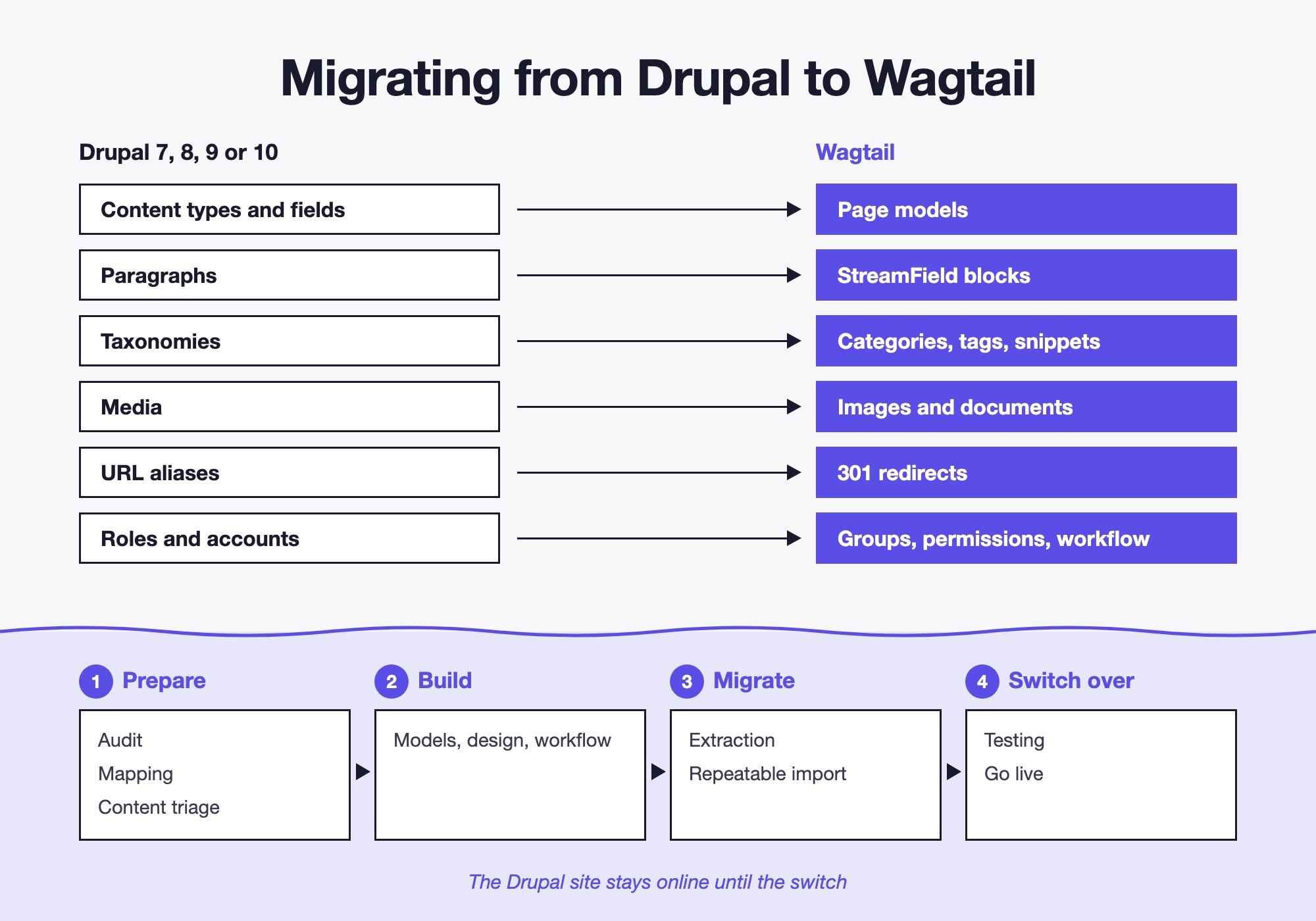
Its update rhythm is predictable: a long-term support (LTS) release ships every year and gets security fixes for about eighteen months. The 7.4 LTS, for example, is maintained until November 2027 (see Wagtail LTS). A site is therefore updated once a year, from LTS to LTS.
For: a simpler editing interface for non-technical teams, fewer third-party dependencies, a predictable update rhythm. Against: coming from Drupal, it is also a rebuild, and Wagtail has fewer ready-made modules: specific features are custom-built, which takes a team that knows Django.
The five options compared
| Option | Immediate work | Content | Horizon | Best for |
|---|---|---|---|---|
| Drupal 7 extended support | Low | Unchanged | A few years, to renew | Those who need time |
| Backdrop CMS | Medium | Taken over as is | That of the Backdrop project | Simple Drupal 7 site |
| Drupal 11, from Drupal 10 | Low to medium | Unchanged | Until Drupal 13, then Drupal 12 | Healthy Drupal 10 site |
| Drupal 11, from Drupal 7 | Rebuild | Migrated | Until Drupal 13, then Drupal 12 | Existing Drupal team |
| WordPress | Rebuild | Migrated | Continuous updates | Small brochure site |
| Wagtail | Rebuild | Migrated | One LTS a year | Structured content, multilingual, approval |
What drives the cost of a migration
The number of pages matters little: an automated import handles a hundred pages like ten thousand. The cost mostly depends on these factors:
- The number of content types: each becomes a model to design, with its own layout.
- Languages: each language adds translations to reconcile and check.
- Custom features: member area, directory, events calendar, payment. Often the heaviest item.
- The quality of existing content: clean content migrates on its own, years of copy-pasting from Word need cleaning up.
- Triage: every page you decide not to migrate is one less page to check.
- Integrations: CRM, emailing tool, payment, single sign-on with other tools.
That is why a serious estimate starts with an audit of the existing site rather than a price per page.
Preparing the migration, whatever CMS you choose
- 1. Inventory: every address on the site (from the sitemap or a crawler), content types and volumes per language.
- 2. Traffic: in Search Console and your analytics, the pages that bring visits and links. They get handled first.
- 3. Triage: keep, merge or archive each piece of content.
- 4. Redirect plan: every old address to its new page, including
/node/123paths and old aliases. - 5. Accounts and personal data: which accounts to migrate, which data to keep, and what your record of processing activities says.
- 6. Switch-over schedule: publishing frozen for a few days, a last import of the changes, go live, then search monitoring for several weeks.
Our method for keeping your Google rankings is detailed in migrating a website without losing SEO.
Common mistakes
- Waiting for a flaw to decide: the project then happens in a rush, at the worst time and at full price.
- Migrating everything without triage: you pay to migrate pages nobody reads any more.
- Forgetting redirects: external links and rankings built up over years vanish overnight.
- Underestimating translations: Drupal 7 stored translations in two different ways depending on the modules used, sometimes on the same site.
- Discovering a feature halfway through: a member area or a form missed during the audit derails the schedule.
- Copying the old site as it is: a migration is the chance to simplify content models and the site structure.
How to choose
- Your site runs Drupal 10 and works for you: move to Drupal 11 before 9 December.
- You are on Drupal 7 and need time: extended support covers the gap while you decide.
- Your Drupal 7 site is simple and you want to keep it as it is: look at Backdrop.
- You have to rebuild anyway: compare Drupal 11 and Wagtail on what matters to you, starting with your editors' comfort and the maintenance cost over five years.
- A small brochure site, one or two people editing it: WordPress or a lighter solution may be enough.
If Wagtail appeals to you, our Drupal to Wagtail migration page details the steps, the approval workflow and the tricky parts of a migration.