


PHP2Shell is the name given to two critical flaws found in PHP, the language that runs about 70% of websites, every WordPress site included. They let a stranger take over a website's server without a password and without anyone clicking anything. The fixes were released in a hurry on 21 October 2026, after a leak. A website that displays perfectly well can still be affected. The facts below were checked on 23 October 2026.
PHP2Shell in two minutes
- What. Two flaws (CVE-2026-109618 and CVE-2026-109619) in PHP itself, rated 9.2 out of 10 by the PHP team and 10 out of 10 by the security firm watchTowr. They allow remote code execution, meaning the attacker can make the server do whatever they want. They can also expose the server's memory, where passwords and access keys pass through.
- When. Details leaked on 20 October 2026, two days before the planned disclosure. PHP released its fixes on 21 October.
- Who. Any server that uses PHP to serve web pages, from version 5.4 (2012) to 8.5. WordPress, Joomla, Drupal, PrestaShop, Magento and Laravel or Symfony sites all run on PHP.
- What to do. Move to PHP 8.5.12, 8.4.27, 8.3.36 or 8.2.35, then restart PHP. The PHP team is clear: there is no complete workaround, updating is the only safe choice.
How we got here
The older of the two flaws comes from code that has been in PHP since version 5.4, released in 2012. According to the timeline published since, a PHP developer had spotted one of the bugs back in 2024, during an audit. It was not fixed: the team could not agree on the right fix, and nobody knew how to exploit it. It slipped down the list.
In August 2026, two research teams found it again independently, at Calif and at Wiz, with the help of artificial intelligence models able to sift through large amounts of old code. That is the deeper shift of recent months: AI speeds up the discovery of flaws. It helps defenders, and it helps attackers just as much.
Disclosure was meant to be coordinated for 22 October, with fixes ready. On the 20th, details spread on Hacker News and X, and a demonstration video was published by mistake. PHP brought its security release forward to the next day. Amazon has since traced an exploitation attempt back to 17 October, and watchTowr saw real attacks on the very day the fixes came out.
Add a fact few people know: PHP, used by most of the world's websites, is maintained by a small team. The PHP Foundation has thirteen employees and runs on donations. Very old code, a huge footprint, a small team and tools that find flaws faster: every ingredient was there.
The response matched the risk. The US NSA advised taking offline any website that could not be updated right away. Several European administrations took sites offline as a precaution, including the Dutch government portal and the websites of the French Interior Ministry.
"My website works": why that proves nothing
It is the sentence we hear most, and it is true: the site loads, the forms send, customers call. It still says nothing about its security, for four reasons.
- The flaw is under the bonnet. PHP2Shell hits the engine that builds the pages, not the pages themselves. A car with worn brakes drives perfectly well, until the day it has to stop.
- The attack needs nothing. No account, no password, no employee clicking a link. Bots sweep the internet non-stop and try the flaw on every server that answers. They do not pick their targets: the size of your business does not protect you.
- A successful attack does not show. Someone who takes over a server wants to stay unnoticed. They install a backdoor to come back later, send spam from your server, redirect your mobile visitors to scams or copy the data from your forms. It is often discovered when Google shows a warning next to the site, or when the host suspends the account.
- Data is at stake. The server's memory holds the database credentials and the keys that connect the site to your tools (payments, emailing, CRM). Under the GDPR, a personal data breach must be reported to the data protection authority within 72 hours.
One last point: an update shuts the door, but it does not throw out someone who is already inside. A site that stayed exposed for several days deserves a check on top of the fix.
Who is affected
Any website whose pages are built by PHP: WordPress, Joomla, Drupal, PrestaShop, Magento, custom Laravel or Symfony sites, as well as hosting control panels such as cPanel or Plesk. The level of risk depends on how PHP is installed (Apache servers with built-in PHP are the most exposed), but no installation that serves web pages is spared. The situation depends above all on the version:
| PHP version | Status on 23/10/2026 | What to do |
|---|---|---|
| 8.2, 8.3, 8.4, 8.5 | Official fix released on 21 October | Update (8.2.35, 8.3.36, 8.4.27 or 8.5.12) and restart PHP. 8.2 is no longer maintained after 31 December 2026: plan the next step. |
| 7.4, 8.0, 8.1 | No longer maintained: no official release, only a fix supplied as source code to rebuild | Check with your host that the fix has been applied. Otherwise, move to a maintained version. |
| 7.3 and older, PHP 5 included | No fix | Migrate, or take the site offline in the meantime. |
The last two rows weigh heavily. According to W3Techs (August 2026), more than one PHP site in three still runs PHP 7 or PHP 5, and a good share of PHP 8 sites stayed on 8.0 or 8.1. That is millions of websites without an official update.
Websites built on hosted platforms such as Wix, Squarespace, Webflow or Shopify have nothing to do: the platform runs its own servers. Static sites and sites built with other languages, such as Python, are not affected by this particular flaw.
Why updating PHP can break a website
If updating is the only fix, why have so many sites stayed on old versions? Because changing PHP version can break the site, so the moment keeps being postponed.
- Every major version cleans house. PHP 7 removed the old database functions, PHP 8 removed others and became stricter: what used to trigger a mere warning now triggers an error, and the error shows a blank page.
- The site is not alone. The theme, the extensions and the libraries all have to keep up. An extension abandoned by its author in 2019 will never be made compatible: it has to be replaced, and sometimes what it did has to be rebuilt.
- The staircase effect. Moving up one version a year is a small job. Jumping from PHP 7.4 to 8.4 in one go means climbing five steps at once, each with its own changes: the job becomes a project, sometimes a redesign.
Many sites left on PHP 7 were not left there out of carelessness. The update meant a budget nobody had planned, so it was put off. That is technical debt: a postponed cost that grows over time. PHP2Shell turns that postponed cost into an emergency.
The maintenance iceberg
What you see of your website is only the tip. Below the surface, five layers each have their own calendar of updates and flaws.
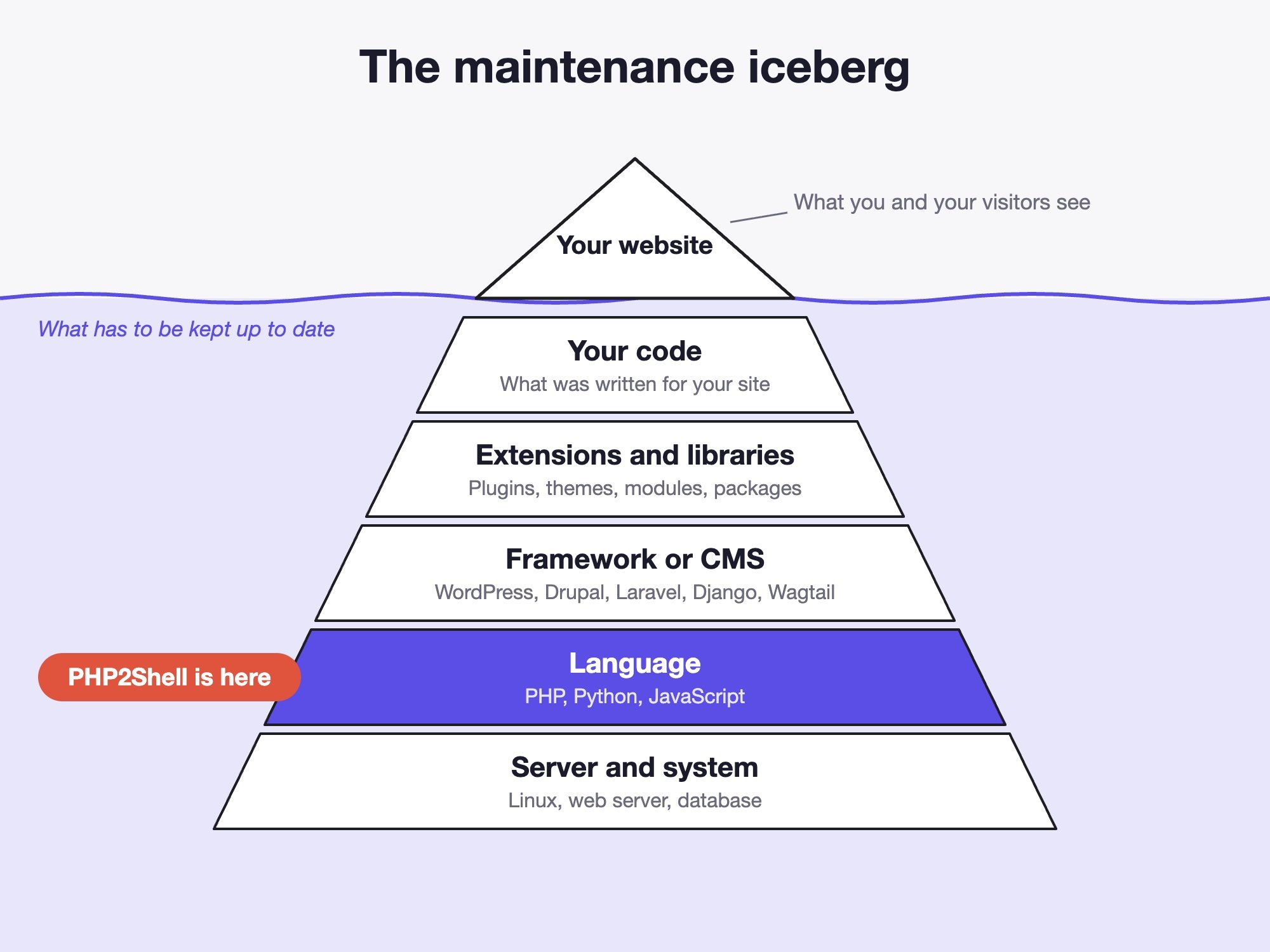
- The server and its system: Linux, the web server, the database.
- The language: PHP, Python, JavaScript. This is where PHP2Shell sits.
- The framework or CMS: WordPress, Drupal, Laravel, Django, Wagtail.
- Extensions and libraries: plugins, themes, modules, packages. For WordPress, this is where the vast majority of flaws come from.
- Your code: what was written for your site, which has to adapt when the layers below change.
A flaw in any of these layers exposes the whole site. And the layers depend on one another: changing the language version forces the CMS, the extensions and your code to follow. That is why a PHP update can touch the site's code. Maintaining a website means moving all five layers forward together, in small steps, rather than letting the gap widen.
What about Python, Django and Wagtail?
PHP2Shell only concerns PHP. A website built in Python, with Django or Wagtail, is not affected by this flaw. That does not make it immune: Django and Wagtail also publish security advisories several times a year (see is Wagtail secure?).
What differs is how readable the calendar is. Each Python version receives fixes for about five years. Django releases a long-term support version every two years: 5.2 is patched until April 2028, while 5.0 and 5.1 already are not. Wagtail follows the same principle: 7.4 LTS is maintained until 2 November 2027, the versions in between for about six months (see which Wagtail version to choose).
These dates are public and known years in advance, which makes it possible to plan upgrades instead of suffering them. But the rule is the same as for PHP: a Django 5.0 site in 2026 no longer receives any fix, exactly like a PHP 7.4 site. The language does not protect a website; its updates do.
Without updates, nobody is safe
No language, no CMS and no provider is free of flaws. The only question that matters is the delay between a fix being published and it being applied to your site. With regular maintenance, that delay is counted in hours or days. Without maintenance, it never ends.
Five questions to ask your provider or your host this week:
- Which version of PHP (or Python, or Django) runs my website, and until when is it maintained?
- Has the PHP2Shell fix been applied, and has PHP been restarted?
- Who watches the security advisories, and how quickly are fixes applied?
- When were the CMS, the theme and the extensions last updated?
- Is there a recent backup, stored somewhere other than the server, and has it ever been restored as a test?
If nobody can answer, your website has no maintenance. A modest yearly budget costs less than an emergency call-out, and far less than a hacked site. If you want to take stock of yours, book fifteen minutes with us.
Sources
- PHP security announcement, 21 October 2026
- watchTowr's PHP2Shell FAQ
- Qualys analysis
- Timeline on Wikipedia
- PHP and PHP version usage, W3Techs
- Supported Django versions and Wagtail release schedule
Further reading
- Is Wagtail secure? The facts
- Wagtail LTS: which version should your site use?
- Why website prices vary tenfold (and what maintenance costs)